Vera Wellness App
Vera is a concept for an AI-assisted wellness app, a place to build small, sustainable habits around movement, sleep and stress, rather than another tracker that measures you and leaves you alone with the numbers.

Role
UI/UX Designer
Timeline
4 Weeks
Team
Solo Designer
Platform
Mobile
Overview
Vera is a concept for an AI-assisted wellness app — a place to build small, sustainable habits around movement, sleep and stress, rather than another tracker that measures you and leaves you alone with the numbers.
I designed it end to end: product direction, information architecture, interface, and a token-based design system built in Figma.
The product
Most wellness apps ask for a lot before giving anything back. They want a goal, a body measurement, a daily commitment — and they present a wall of programs that all look equally demanding.
Vera starts from a different assumption: the barrier isn't motivation, it's the size of the first step. So the product is organised around short, specific, low-commitment entry points, with an AI assistant that adapts the plan instead of handing you a fixed one.
Three surfaces carry the product:
Discover — programs, routines and challenges, filtered by what you're actually trying to change
Insights — short, readable content connected to the behaviour you're working on
Vera AI — a conversational layer that personalises the plan
Design decisions
Onboarding: one clear path, three quiet alternatives

Sign-up is the highest-drop-off moment in any consumer app, and the temptation is to offer everything at once. Instead I made email the single primary action and reduced social sign-in to a row of icon buttons underneath.
The subtitle does specific work: it names what you get in exchange for creating an account — save your goals, track progress, get guidance. An account request without a stated benefit is just a toll gate.
The photograph is a person mid-practice, alone, outdoors at low light. That was a deliberate rejection of the gym-and-abs visual language most wellness apps default to. The product is about returning to yourself, not competing.
Discover: time as the primary filter
The program cards lead with a duration badge — 5 min/day, 15 min/day, 7-Day Sleep Reset — before they lead with a title or an image.
That ordering is the core decision of the screen. When someone is deciding whether to start something, the question in their head is not "is this good?" but "can I actually fit this in?" Putting the time cost first answers the disqualifying question before the aspirational one, which lowers the cost of saying yes.
Insights: filters that follow intent, not taxonomy
The chips read For You · Sleep · Health · Fitness, with "For You" selected by default. The categories match how someone describes their problem — I'm not sleeping — rather than how a content team would file it.
The article titles were written to be usable on their own: The 2-Minute Rule for Consistency, Why You're Tired (Even After 8 Hours). Each one states a benefit or asks a question the reader already has. Content in a wellness product isn't decoration; if the titles don't earn a tap, the section is dead weight.
AI as a place, not a floating button
Vera AI gets its own tab in the primary navigation, alongside Home, Discover and Profile.
Most products attach AI to a floating action button — which signals "extra feature," something bolted on. Giving it equal footing in the nav says it's a permanent part of how the product works, and it also makes the interaction discoverable without a tooltip or an onboarding tour.
The trade-off is real: a four-tab bar with AI in it spends navigation budget that could have gone to something else, and the tab has to justify itself on every session or it becomes dead space.
The design system
I built the system before I built the screens, which changed how the screens came out.
Two-layer tokens
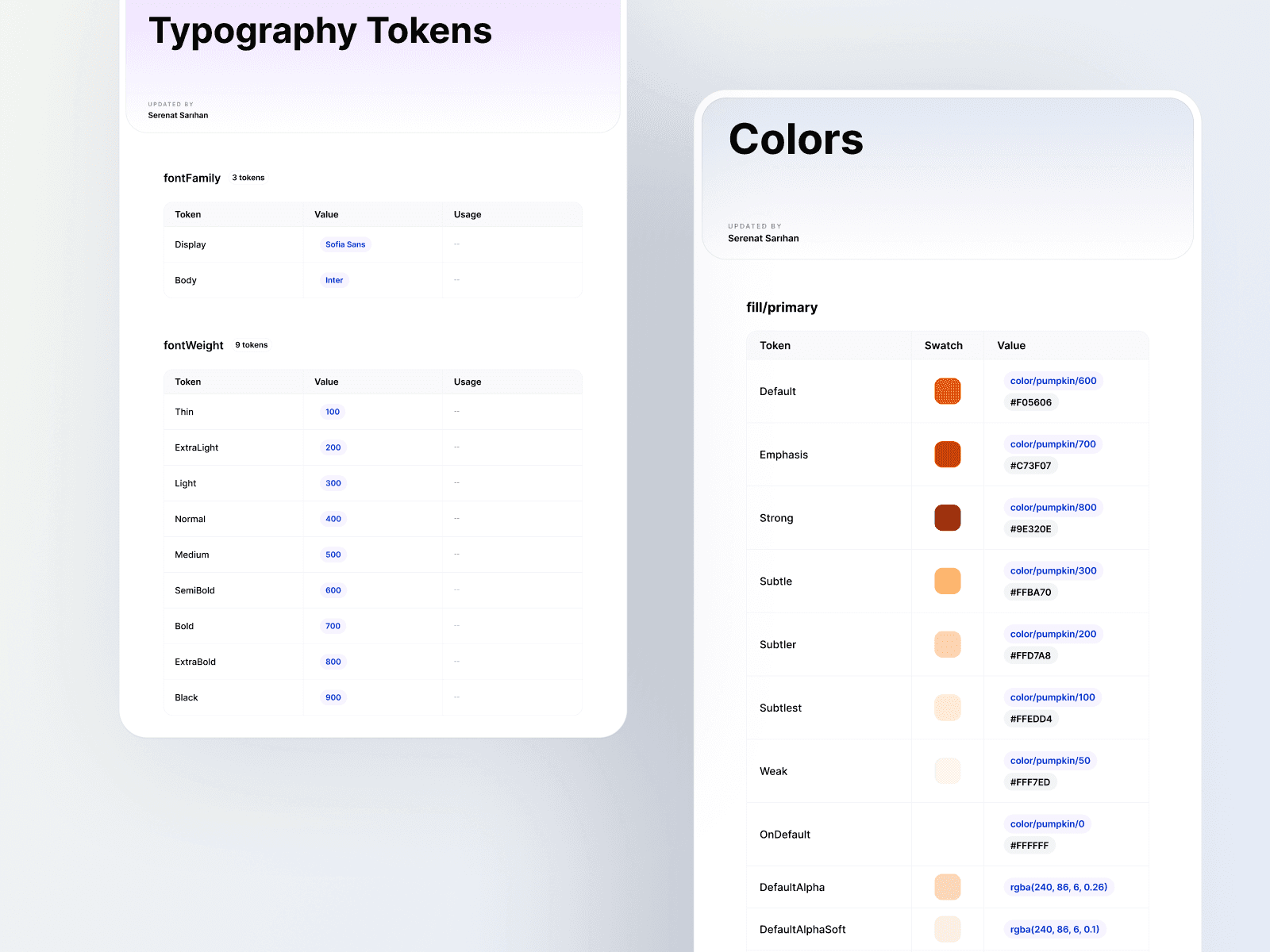
Colours are defined twice. A primitive layer holds the raw palette — color/pumpkin/600, pumpkin/700, and so on across the scale. A semantic layer sits on top and describes role rather than value: fill/primary/Default, Emphasis, Strong, Subtle, Weak, OnDefault.
This is the decision I'd defend hardest. Naming a token by its role rather than its colour means the palette can change without touching a single component. A system named orange-600 breaks the day the brand shifts; a system named fill/primary/Emphasis doesn't.
The set also includes OnDefault for foreground-on-fill pairing, and alpha variants (DefaultAlpha, DefaultAlphaSoft) for overlays and pressed states — so transparency is a system decision rather than something improvised per screen.
Typography
Two families, each with a job. Sofia Sans for display — it carries personality at large sizes. Inter for body — built for screen reading at small sizes, and it gets out of the way.
Documentation
The system is documented with tokens, values and usage columns rather than left as a Figma file to be interpreted. A design system that only exists as components is a personal preference; one that's written down is something a team can actually use.
